
API Signature
Digitally signing an API request is generally used to validate the integrity of data received from a server. Presented below is a high level diagram illustrating how merchants will do the signing of requests and the authentication of responses to and from public Maya APIs, using an asymmetric key scheme:
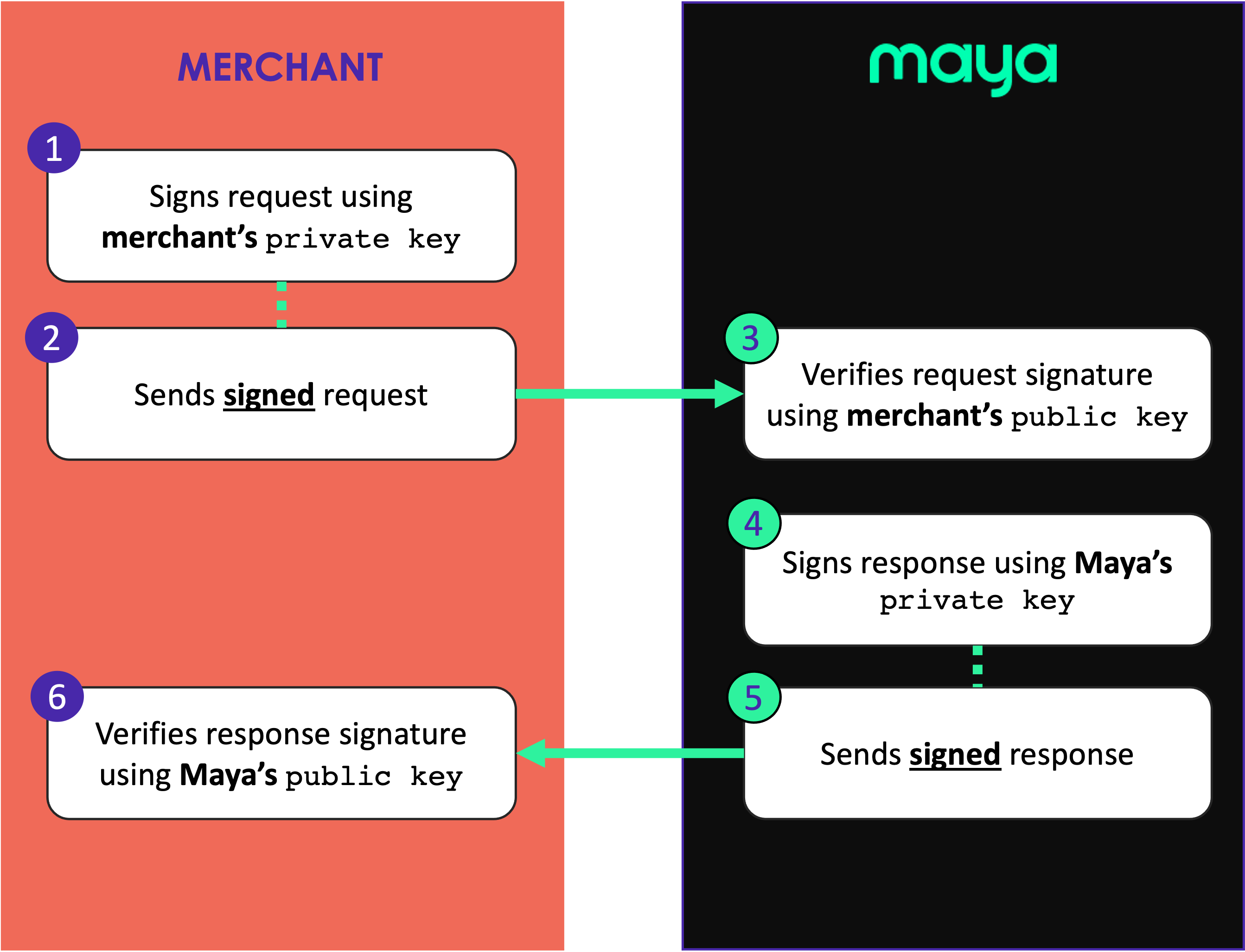
How API Signature works
MERCHANT
MAYA
Signing Request
- Creates/obtains your own private key to be used in signing the request.
- Signs the request using Maya’s signing algorithm.
- Adds the custom header,
Maya-Signature, which should include the signature value and timestamp of the request. - Sends the signed request to Maya.
The corresponding
public keyof the merchant should be provided to Maya to proceed with API request signature verification below.
Verifying Request
- Retrieves
Maya-Signaturefrom request headers.- If timestamp is missing or invalid, reject request
- If signature is missing or invalid, reject request
- Allows the request if timestamp and signature verification has succeeded.
Signing Response
- Signs the response using Maya’s signing algorithm.
- Adds the custom header,
Maya-Signature, which should include the signature value and timestamp of the response. - Sends the signed response to merchant.
The corresponding
public keyof Maya should be provided to merchant to proceed with API response signature verification below.
Verifying Response
- Retrieves
Maya-Signaturefrom response headers.- If timestamp is missing or invalid, reject response
- If signature is missing or invalid, reject response
- Allows the response if timestamp and signature verification has succeeded.
Scope and Limitations
API signature is only available on API requests towards Maya. Webhook payloads sent by Maya are NOT included in this feature.
Generating your RSA key pair
Before you can sign your requests, you need to generate your own RSA key pair. You may use OpenSSL to generate your RSA key pair by following the instructions provided below.
- Install OpenSSL
 in your system.
 - Generate an RSA key pair, of size 2048, and output it to a file (sample file name below is
key.pem):openssl genrsa -out key.pem 2048 - Extract the public key from the key pair (sample file name below is
public.pem):openssl rsa -in key.pem -outform PEM -pubout -out public.pem
Supported Key Formats
The following OpenSSL key format is supported:
| Format | Type | Bits | Exponent | Hashing Algo |
|---|---|---|---|---|
| PEM | RSA | 2048 | 65537 | SHA256 |
Submission of your public key
Please contact your Maya Relationship Manager to coordinate the submission of your public key. This key will be used by Maya to verify the signed request you provide.
Configuration
- Merchant needs to provide their
public keyto Maya in order for the latter to verify API request signature from the former.- Merchant needs to keep their corresponding
private keyin order to sign API requests. - The
public keywill be stored by Maya and will be used for all API request verification for the merchant.
- Merchant needs to keep their corresponding
- Maya needs to provide their
public keyto the merchant in order for the latter to verify API response signature from the former.- Maya needs to keep their corresponding
private keyin order to sign API responses.
- Maya needs to keep their corresponding
- The API signature feature may be enabled in the following modes:
- Test mode - Maya only verifies signature if
Maya-Signatureis present in the request headers. - Force mode - Maya always verifies and signs requests and responses.
- Test mode - Maya only verifies signature if
Key Rotation
When Maya provides their public key, it will be associated with a keyId. This keyId will be utilized to identify the correct key used when Maya rotates its signing key pair.
The merchant, on the other hand, should likewise rotate and submit their new public key ahead of the existing one’s target expiration. Upon receipt of new public key, Maya will associate it with a keyId.
Replay Protection
Every signed request includes a timestamp element. In situations involving replay attacks, the timestamp value is examined to ensure it falls within the timeframe during which the request should have been received by Maya.
The default tolerance is 5 minutes between the timestamp and the current time.
Signing the Request
At this point, you should have done the following:
- Generated your key pair (
private keyandpublic key)- Submitted and enrolled your
public keyto Maya. Please contact your Maya Relationship Manager to coordinate the submission of your public key.
The following steps narrate how to sign a request message:
-
Construct the content to be signed, which is composed of the following entities:
Request Method- the HTTP Method used in the request.Request URI- the HTTP URI part that contains the path, query and/or fragment of the full URI.Request Timestamp- the timestamp in Unix time format (seconds) when the request is created by the client.Request Body- the serialized data as sent by the client.
-
To illustrate, the following is an example request with the components identified:
curl --request POST 'https://pg-sandbox.paymaya.com/accounts/links' \ --header 'Content-Type: application/json' \ --data '{"type":"maya","requestReferenceNumber":"57d933cc-c870-4b68-bbff-93882f6dac96","redirectUrls":{"success":"https://http.cat/200?state=success","failure":"https://http.cat/400?state=failure","cancel":"https://http.cat/400?state=cancel"},"userCustomizations":{"skipResultPage":true}}'- Request Method =
POST - Request URI =
/accounts/links - Request Timestamp -
1692697424(Assuming request is created on Tue Aug 22 2023 09:43:44 GMT+0000) - Request Body =
{"type":"maya","requestReferenceNumber":"57d933cc-c870-4b68-bbff-93882f6dac96","redirectUrls":{"success":"https://http.cat/200?state=success","failure":"https://http.cat/400?state=failure","cancel":"https://http.cat/400?state=cancel"},"userCustomizations":{"skipResultPage":true}}
- Request Method =
-
After determining the components, the content to be signed should be created using the following syntax (single-space-delimited syntax):
<Request Method> <Request URI> <Request Timestamp> <Request Body>Note: In case the
Request Bodyis not provided (i.e. for GET requests), the syntax is:<Request Method> <Request URI> <Request Timestamp>Using the provided example, the resulting content to be signed is:
POST /accounts/links 1692697424 {"type":"maya","requestReferenceNumber":"57d933cc-c870-4b68-bbff-93882f6dac96","redirectUrls":{"success":"https://http.cat/400?state=success","failure":"https://http.cat/400?state=failure","cancel":"https://http.cat/400?state=cancel"},"userCustomizations":{"skipResultPage":true}} -
Sign the resulting string using your private key via
SHA256 with RSAsignature creation. The resulting signature should be encoded inBase64then escaped to URI characters. The following are sample steps to perform the signing via command line (e.g. using OpenSSL):# Let privatekey.pem be your RSA private key in PEM format # Let data.txt be the file that contains the data to be signed touch data.txt echo 'POST /accounts/links 1692697424 {"type":"maya","requestReferenceNumber":"57d933cc-c870-4b68-bbff-93882f6dac96","redirectUrls":{"success":"https://http.cat/400?state=success","failure":"https://http.cat/400?state=failure","cancel":"https://http.cat/400?state=cancel"},"userCustomizations":{"skipResultPage":true}}' > data.txt # Sign the data.txt using your private key openssl dgst -sha256 -sign privatekey.pem -out data.txt.signature data.txt # Encode the signature to Base64 base64 -i data.txt.signature -o data.txt.signature.base64 # Encode the Base64 string to URI # Let encodeUriComponent be a custom CLI command that encodes content of a text file into URI component characters encodeUriComponent -i data.txt.signature.base64 -o data.txt.signature.base64.encodedUri -
Send the request with the following custom header
Maya-Signaturewith the following syntax:Maya-Signature: timestamp=1692697424, version=1, keyId=1, signature=sKOAO%2BAg1tBOfNSPfqLl%2FLd2eFqY%2FtMpuV9maDbq7a8a%2BWUjhq3UR8Df%2BohOmqJEvEPkntoGbW6SXIZ1JtSuQQxTBmMErCAtumu6bIRJHoK4%2BMnoVnB6rBJog95GtYXJivqyCIardvqidL6b8YloB4bZy6%2B2mHetpgR9suOTHoe6H2JNpbvIvg34IvE8GXwnkYCTvlLKrTTRO45Nc0yoEdTzqjKuN4btpl6ToKrA9fdCIJAbI0pwWMa2GlYreF5DxpOAj9aEKQ3R4Bh5mUQwdzBwwmoSipBwslVAEUAh4jR%2F%2B65AwhDfVd1TkGQfAuYOfVQJWaJj1tq4d3eKrbDLrg%3D%3Dwhere:
| Variable | Description |
|---|---|
timestamp | REQUIRED contains the value of Request Timestamp |
signature | REQUIRED the URL encoded signature in step 4 |
version | OPTIONAL specifies the version of the signing algorithm utilized, with the current supported value being 1 |
keyId | OPTIONAL contains the keyId of the merchant’s public key as submitted to Maya. If this is not provided, the latest key will be used by Maya to verify the request. This is used to facilitate key rotation when merchant rolls their RSA key pair. |
Verifying the Response
At this point, you should have obtained Maya's public key. Please coordinate with your Maya Relationship Manager to acquire this key.
The following steps narrate how to verify a response message:
-
From the response headers, get the
Maya-Signatureheader, which has the following key-value pairs:Variable Description timestampcontains the value of Response Timestamp(for example: 1692697460 assuming response is sent on Tue Aug 22 2023 09:44:20 GMT+0000)versionspecifies the version of the signing algorithm utilized, with the current supported value being 1 keyIdcontains the keyId of the Maya’s public key as provided to the merchant. signaturethe URL encoded signature. -
Construct the content to be verified, which is composed of the additional entities:
Request Method- the HTTP Method used in the corresponding request.Response URI- the HTTP URI part that contains the path, query and/or fragment of the full URI. This is the same as Request URI.Response Body- the serialized data sent by Maya.
-
To demonstrate, the following is an example response:
Body:{"result":"SUCCESS","data":{"id":"44cc575e-ee21-45e0-a420-e8acab5ae196","state":"LINK_INACTIVE","type":"maya","requestReferenceNumber":"57d933cc-c870-4b68-bbff-93882f6dac96","redirectUrls":{"success":"https://http.cat/200?state=success","failure":"https://http.cat/400?state=failure","cancel":"https://http.cat/400?state=cancel"},"userCustomizations":{"skipResultPage":true},"createdAt":"2023-08-22T09:44:20Z","updatedAt":"2023-08-22T09:44:20Z","activationUrl":"https://checkouts-sandbox.maya.ph/v2/accounts/links?id=44cc575e-ee21-45e0-a420-e8acab5ae196"}}- Request Method =
POST - Response URI =
/accounts/links - Response Body =
{"result":"SUCCESS","data":{"id":"44cc575e-ee21-45e0-a420-e8acab5ae196","state":"LINK_INACTIVE","type":"maya","requestReferenceNumber":"57d933cc-c870-4b68-bbff-93882f6dac96","redirectUrls":{"success":"https://http.cat/200?state=success","failure":"https://http.cat/400?state=failure","cancel":"https://http.cat/400?state=cancel"},"userCustomizations":{"skipResultPage":true},"createdAt":"2023-08-22T09:44:20Z","updatedAt":"2023-08-22T09:44:20Z","activationUrl":"https://checkouts-sandbox.maya.ph/v2/accounts/links?id=44cc575e-ee21-45e0-a420-e8acab5ae196"}}
- Request Method =
-
After determining the components, the content to be signed should be created using the following syntax:
<Request Method> <Response URI> <Response Timestamp> <Response Body>Using the provided example, the resulting content to be signed is:
POST /accounts/links 1692697460 {"result":"SUCCESS","data":{"id":"44cc575e-ee21-45e0-a420-e8acab5ae196","state":"LINK_INACTIVE","type":"maya","requestReferenceNumber":"57d933cc-c870-4b68-bbff-93882f6dac96","redirectUrls":{"success":"https://http.cat/200?state=success","failure":"https://http.cat/400?state=failure","cancel":"https://http.cat/400?state=cancel"},"userCustomizations":{"skipResultPage":true},"createdAt":"2023-08-22T09:44:20Z","updatedAt":"2023-08-22T09:44:20Z","activationUrl":"https://checkouts-sandbox.maya.ph/v2/accounts/links?id=44cc575e-ee21-45e0-a420-e8acab5ae196"}} -
Get the signature from the response header by getting the value of the header
Maya-Signature. -
Validate the signature using Maya’s public key (as identified by
keyId) and applySHA256 with RSAsignature verification on the content string and base64-decoded signature indicated in steps 3 and 4, respectively. The following are sample steps to perform the signature verification via command line (e.g. using OpenSSL):# Let publickey.pem be Maya's public key in PEM format # Let data.txt.signature.base64.encodedUri be the encoded URI Base64 signature # Decode the Based64 signature from having encoded URI characters # Let decodeUriComponent be a custom CLI command that decodes content of a text file that has URI component characters decodeUriComponent -i data.txt.signature.base64.encodedUri -o data.txt.signature.base64 # Decode the signature from Base64 base64 --decode -i data.txt.signature.base64 -o data.txt.signature # Let data.txt be the file that contains the data to be verified touch data.txt echo 'POST /accounts/links 1692697460 {"result":"SUCCESS","data":{"id":"44cc575e-ee21-45e0-a420-e8acab5ae196","state":"LINK_INACTIVE","type":"maya","requestReferenceNumber":"57d933cc-c870-4b68-bbff-93882f6dac96","redirectUrls":{"success":"https://http.cat/200?state=success","failure":"https://http.cat/400?state=failure","cancel":"https://http.cat/400?state=cancel"},"userCustomizations":{"skipResultPage":true},"createdAt":"2023-08-22T09:44:20Z","updatedAt":"2023-08-22T09:44:20Z","activationUrl":"https://checkouts-sandbox.maya.ph/v2/accounts/links?id=44cc575e-ee21-45e0-a420-e8acab5ae196"}}' > data.txt # Verify the data.txt using Maya's public key openssl dgst -sha256 -verify publickey.pem -signature data.txt.signature data.txt
Make sure to decode URI characters from the signature before verifying.
In case of verification failure, it is advised to reject the response.
Error Codes
When an error is encountered-related to the API signature, the API responds with a JSON error response with the following sample schema:
{
    "error": "Invalid authentication credentials. Kindly verify if the key you are using is correct.",
    "code": "K008",
    "reference": "084551e8-491e-4186-85e8-e2d1575c787b"
}
where:
error- is a description of the error that has occurred.code- the error code identifying the error that has occurred.reference- a unique log reference number of the operation that failed (for investigation purposes).
No signature will be provided in the response when any of the errors below are returned.
| HTTP Status | code | error |
|---|---|---|
| 401 | K008 | Invalid signature. Please check the provided signature. |
| 401 | K009 | Invalid timestamp. Please check the provided timestamp. |
| 401 | K010 | Expired sign key. Please update your sign key. |
| 401 | K011 | Invalid signature version. Please check the provided version. |
| 401 | K012 | Invalid signature keyId. Please check the provided keyId. |
Updated 6 months ago