
This document is in active development. As a pioneer merchant, you will be informed of new changes. Visit our Release Notes for more details.
Overview
Leverage Maya’s Remittance API to send remittance to an account owned by the receiving party.
- You can use either the Operating Wallet in Maya PH or a Business Deposit account in Maya Bank as your funding source
- Perform sending of remittances to the Maya Wallet
- Perform sending of remittances to other financial entities via InstaPay
API Sequence
This solution uses Bearer Token Authentication. Your application must secure a valid access_token from Maya Connect to authenticate your requests.
For more details, refer to Bearer Authentication  .
.
- The customer provides remittance information to the API Consumer.
- The API Consumer checks for a valid
access_token.- If
access_tokenis expired or no validaccess_tokenexists:- The API Consumer requests a new
access_tokenvia Maya Connect. - Maya Connect responds to the API Consumer with the
access_token. - The API Consumer saves the
access_token.
- The API Consumer requests a new
- If
- The API Consumer initiates the send transaction by calling the Initiate Send
endpoint of the Maya Remittance API.
- The Maya Remittance API checks if the transaction is a retry.
- If it's a new send transaction, Maya Remittance API will proceed with the processing of the request, otherwise, Maya Remittance API will decline the request.
- Maya Remittance API creates a remittance record with
INITIATEDstatus. - Maya Remittance API responds to the API Consumer with the generated
id. - The API Consumer saves the
id. - The API Consumer asks the customer for transaction confirmation.
- The customer provides their confirmation.
- The API Consumer checks for a valid
access_token.- If
access_tokenis expired or no validaccess_tokenexists:- The API Consumer requests a new
access_tokenvia Maya Connect. - Maya Connect responds to the API Consumer with the
access_token. - The API Consumer saves the
access_token.
- The API Consumer requests a new
- If
- The API Consumer sends a confirmation request to Maya Remittance API via the Confirm Send
endpoint.
- Maya Remittance API processes and updates the status of the send transaction to
PROCESSING. - Maya Remittance API responds to the API Consumer with
PROCESSINGstatus. - Maya Remittance API debits funds from the source account.
- Maya Remittance API credits funds to the receiver.
- Maya Remittance API receives response from the receiver and triggers a callback:
- If crediting succeeds: Maya Remittance API notifies the API Consumer of the
APPROVEDstatus. - If crediting fails: Maya Remittance API notifies the API Consumer of the
DECLINEDstatus. This will entail returning the funds back to the source account.
- The API Consumer acknowledges the callback by responding with a 200 OK to the Maya Remittance API.
- The API Consumer processes the callback.
- If no callback is received:
- The API Consumer checks for a valid
access_token - If
access_tokenis expired or no validaccess_tokenexists:- The API Consumer requests a new
access_tokenvia Maya Connect. - Maya Connect responds to the API Consumer with the
access_token. - The API Consumer saves the
access_token.
- The API Consumer requests a new
- The API Consumer queries Maya Remittance API via the Get Send
endpoint
- Maya Remittance API responds to the API Consumer with the send details.
- The API Consumer processes the updates.
- The API Consumer checks for a valid
- If no callback is received:
- The API Consumer updates the customer on the status of the remittance.
Build your Integration
This solution uses Bearer Token Authentication. Your application must secure a valid access_token from Maya Connect to authenticate your requests.
For more details, refer to Bearer Authentication .
Initiate the send
Prepare and create the remittance transaction.
Step 1: Prepare the required details
Sender and receiver details are crucial for screening and identifying the destination account. Below is a list of essential information needed when initiating a remittance:
| Information | Description |
|---|---|
| Source Account Details | Specifies the source account from which funds will be pulled for the remittance. The required details to identify your source account include the account number, account name, and the financial institution where the account is held. The financial_institution_code must be a valid SWIFT code of Maya, based on your account type:
|
| Receiver Account Details | Specifies the receiver’s or target account from which funds will credited. The required details to identify your target account include the account number, account name, and the financial institution where the account is held. The financial_institution_code must be a valid SWIFT code of a bank in the Philippines. |
| Sender Information | Includes Sender KYC details |
| Receiver Information | Includes Receiver’s KYC details |
Ensure all necessary information is complete and accurate to facilitate a smooth transaction. Refer to the API specifications of Initiate Send for the full list of required fields.
Step 2: Initiate a send request
No movement of funds will be done during this step.
After preparing the required information, send the request to the Initiate Send endpoint.
Maya will validate the source and receiving accounts, including account status, limits, and restrictions. KYC information of both the sender and receiver will also be checked for sanctions. Maya will then respond with the initial validation results.
Ensure the status is INITIATED and store the returned id before proceeding to the next steps.
Please note that the initiate send is valid for only 1 hour. After this period, the transaction will be transitioned to LAPSED status. Any attempt to confirm a LAPSED transaction will result in the error REMGTW0012 .
Confirm the send
Confirm and process the remittance transaction.
Triggering the Confirm Send finalizes the request and authorizes the balance movement.
When the remittance request is confirmed, use the acquired remittance id and call the Confirm Send endpoint to proceed with the request. Validations will be conducted while securing the amount from your fund source.
You can only confirm an INITIATED send, otherwise, confirm send will return the current status of the send transaction whether it’s APPROVED, DECLINED, or PROCESSING. See also sample response payloads in Confirm Send .
Maya will acknowledge receipt of the request by responding with the initial remittance status update: PROCESSING while conducting validations and proceeding with the transfer.
Monitor the send
Monitor and receive transaction status updates.
Balance transfers are processed asynchronously to handle potential timeouts and latency spikes that often cause ambiguous transaction states.
The resulting status after processing the transaction is final.
Maya uses callbacks to inform your application about specific events related to the remittance transaction. These notifications include the transaction status and response codes.
Maya’s callback will trigger a maximum of 5 times.
- Immediately after the status event is triggered
- Retry immediately after the initial callback failed
5 minsafter the previous callback failed10 minsafter the previous callback failed15 minsafter the previous callback failed
If your application doesn't receive callbacks from Maya, you may use the Get Send endpoint instead.
Step 1: Identify the events
Identify the events you want to monitor and the event payloads to parse.
Step 2: Create a callback endpoint
Create a callback endpoint as an HTTP endpoint (URL). This endpoint is expected to receive a POST request with JSON payload from Maya for a given account link event. The endpoint is expected to return a 2xx response status code.
A callback should be SSL-secured (https) and publicly available.
It is also recommended to use port 443 for your SSL configuration. Your application may experience network issues when integrating with Maya using non-standard ports.
const express = require('express');
const app = express();
app.post('/remittance/send/direct/callback', async (req, res) => {
  // TODO: You will have to implement the logic of this method.
  processMayaCallbackData(req.body);
  res.send({
    success: true
  })
});
app.listen(8080, () => console.log('Listening on port ${8080}!'));
Step 3: Test your callback
Test that your callback endpoint is working properly. You can execute your callback endpoint via a simple curl command or through an API client application like Postman.
Sample Callback Endpoint Test via curl
$ curl -s -D - -o /dev/null -X POST -H "Content-Type: application/json" \
-d '{
  "id": "c36d9958-9c55-49e3-b70e-702b082046c0",
  "status": "APPROVED",
  "created_timestamp": "2024-06-05T04:12:43.451977Z",
  "updated_timestamp": "2024-06-05T04:17:12.865432Z",
  "confirmation_deadline": "2024-06-05T04:22:43.451995Z",
  "request": {
    "source_account": {
      "financial_institution_code": "PAPHPHM1XXX",
      "account_number": "331234567898"
    },
    "receiver_account": {
      "financial_institution_code": "PAPHPHM1XXX",
      "account_number": "+639498187453",
      "account_name": "Maria Reyes"
    },
    "sender": {
      "contact_information": {
        "type": "msisdn",
        "value": "+639336143939"
      },
      "name": {
        "first_name": "John Mark",
        "middle_name": "De Guzman",
        "last_name": "Dela Cruz"
      },
      "nationality": "PH",
      "gender": "M",
      "birth_date": "1995-12-31",
      "birth_place": {
        "city": "Paris",
        "country": "FR"
      },
      "present_address": {
        "line1": "3701 Summerfield Blvd",
        "line2": "Suite 204",
        "locality": "Bastille",
        "state": "Paris",
        "zip_code": "11200",
        "city": "L Haÿ-les-Roses",
        "country": "FR"
      },
      "permanent_address": {
        "line1": "3701 Summerfield Blvd",
        "line2": "Suite 204",
        "locality": "Bastille",
        "state": "Paris",
        "zip_code": "11200",
        "city": "Paris",
        "country": "FR"
      },
      "income_source": "Salary",
      "additional_income_source": "Inheritance",
      "identification": {
        "type": "Passport",
        "number": "110-230-987-000",
        "issue_country": "FR",
        "issue_date": "2000-01-01",
        "expiry_date": "2050-01-01"
      },
      "employment": {
        "work_nature": "IT Companies",
        "additional_work_nature": "Government Service (LGUs, etc.)",
        "position_level": "Owner",
        "employer_name": "Maya Bank Inc."
      },
      "additional_information": {
        "hair_color": "black",
        "eye_color": "brown"
      }
    },
    "receiver": {
      "contact_information": {
        "type": "msisdn",
        "value": "+639498187453"
      },
      "name": {
        "first_name": "Maria",
        "middle_name": "Reyes",
        "last_name": "Reyes"
      },
      "nationality": "PH",
      "gender": "F",
      "birth_date": "2000-01-01",
      "birth_place": {
        "city": "Parañaque City",
        "country": "PH"
      },
      "present_address": {
        "line1": "Blk 7 Lot 24 Maligaya St.",
        "line2": "6F Launchpad Bldg.",
        "locality": "Bgry. Nagkaisang Nayon",
        "state": "Metro Manila",
        "zip_code": "1240",
        "city": "Parañaque City",
        "country": "PH"
      },
      "permanent_address": {
        "line1": "Blk 7 Lot 24 Maligaya St.",
        "line2": "6F Launchpad Bldg.",
        "locality": "Bgry. Nagkaisang Nayon",
        "state": "Metro Manila",
        "zip_code": "1240",
        "city": "Parañaque City",
        "country": "PH"
      },
      "income_source": "Salary",
      "additional_income_source": "Inheritance",
      "identification": {
        "type": "Government Office and GOCC IDs (AFP, NBI, etc.)",
        "number": "PM2512345",
        "issue_country": "PH",
        "issue_date": "2000-01-01",
        "expiry_date": "2050-01-01"
      },
      "employment": {
        "work_nature": "IT Companies",
        "additional_work_nature": "E-commerce/Online Business",
        "position_level": "Senior Level/Executive",
        "employer_name": "Maya Philippines Inc."
      },
      "additional_information": {
        "hair_color": "black",
        "eye_color": "brown"
      }
    },
    "amount": {
      "currency": "PHP",
      "value": 1249.26
    },
    "origin_country": "PH",
    "transaction_purpose": "Family Support/Allowance",
    "relationship_to_receiver": "Father",
    "additional_information": {
      "eye_color": "brown"
    }
  },
  "transfer_details": {
    "source": {
      "ending_balance": {
        "current_balance": {
          "currency": "PH",
          "value": 10734124.63
        },
        "available_balance": {
          "currency": "PH",
          "value": 10734124.63
        }
      }
    },
    "gross_amount": {
      "currency": "PHP",
      "value": 1018.5
    },
    "principal_amount": {
      "currency": "PHP",
      "value": 1000
    },
    "commission": {
      "currency": "PHP",
      "value": 11.5
    },
    "fee": {
      "currency": "PHP",
      "value": 7
    }
  }
}' \
https://83ef-130-105-160-253.ngrok.io/remittance/send/direct/callback
When the output of the curl command shows a 200 response code that means that your callback is reachable and will return a status 200 OK.
HTTP/2 200
content-type: application/json; charset=utf-8
date: Mon, 14 Feb 2022 01:08:14 GMT
ngrok-agent-ips: 130.105.160.253
content-length: 18
Step 4: Deploy and endorse your callback URL
Deploy your callback and endorse the URL for enrollment to your Maya Relationship Manager.
Endpoints
| Name | HTTP Method | Key Type | Endpoint | Description |
|---|---|---|---|---|
| Initiate Send | POST | BEARER TOKEN | /v1/remittances/send | Use this API to initiate the sending of a remittance transaction; This will perform all the validations for the requested remittance to be processed. This API returns the id which you will use to confirm the processing of the remittance transaction |
| Confirm Send | PUT | BEARER TOKEN | /v1/remittances/send/{id}/confirmation | Use this API to confirm the processing of the initiated send remittance transaction; This will return a claiming_details for send remittances that the receiver will pick up to either Maya Center or Maya affiliated partner |
Managing Transactions
| Name | HTTP Method | Key Type | Endpoint | Description |
|---|---|---|---|---|
| Get Send | GET | BEARER TOKEN | /v1/remittances/send/{id} | Use this API to get the status of the send remittance transaction. |
Business Rules to Code
Retry vs Create New Transaction
Maya’s Remittance APIs enforce strict idempotency rules for each API consumer using the x-idempotency-key in their API requests.
x-idempotency-key in their API requests.Maya implemented the idempotency checks to the Initiate Send endpoint.
Retry
A transaction will be considered a retry when the Remittance API receives a request with the same x-idempotency-key.
Note that retries will never be processed even if the original attempt failed. Maya will reject the request with the error code REMGTW0011 or REMGTW0014
.
Create New Transaction
Each request with a unique and unused x-idempotency-key will be treated as a new transaction, even if the request body is identical to a previous attempt.
Processing a new transaction may vary depending on the validation and business rules of the processor and the receiving financial entity.
Transaction Statuses
In the Maya Remittance API, the transaction status indicates the current state of the transaction.
status indicates the current state of the transaction.Here is a transition state diagram representing the statuses of the transaction process:
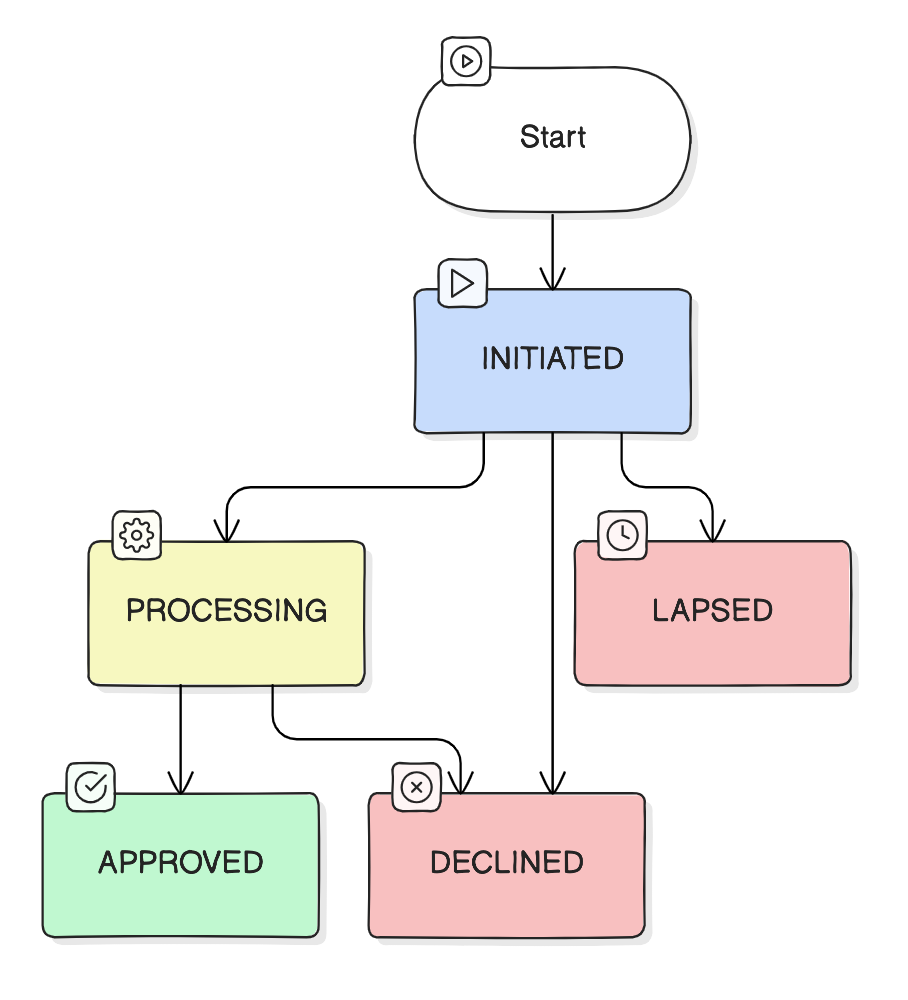
| Status | Description | Results from |
|---|---|---|
INITIATED | The transaction is initiated by the requestor and successfully validated by the service | Initiate Send |
PROCESSING | The transaction has been confirmed and the balance transfer is still in progress | Confirm Send |
APPROVED | The transaction is successful | Confirm Send |
DECLINED | The transaction is declined during initiation or fails during processing | Initiate Send, Confirm Send |
LAPSED | The initiated transaction is no longer valid because the confirmation deadline has been exceeded | Confirm Send |
Sandbox Test Data
Provided here are the test data you could use in the sandbox.
| Fields | Description | Test Data |
|---|---|---|
| Source Account Details | Values to be used in source_account when using Initiate Send | To be provided after partner onboarding |
| Receiver Account Details | Values to be used in receiver_account when using Initiate Send | Maya Walletreceiver_account.financial_institution_code = PAPHPHM1XXXreceiver_account.account_number = 639101000112Instapay - participating Bank receiver_account.financial_institution_code = MBTCPHMMXXXreceiver_account.account_number = 111222333 |
Handling Errors
When integrating with our remittance APIs, you may encounter two types of errors: ambiguous and unambiguous.
Ambiguous errors
Ambiguous errors are those whose response body does not follow any specified error response structures. They are not definitive and do not represent the actual processing result from Maya. Examples include:
- Connectivity timeouts and network interruptions, often appear as socket timeout or socket closed
- Interface downtimes; occur if the API gateway mediating our communication goes down. They typically show as HTTP 503 with no response body or a response body that doesn't match any documented structure
Maya recommends handling ambiguous errors by performing Get Send to validate the latest stats of the transaction. If an inquiry is not possible due to lack of reference, performing a retry is an alternative.
Unambiguous errors
If a transaction processing encounters an error, the response from Maya will include the error object within the response body. The error code signifies the specific issue faced during the creation and processing of the transaction. You can find the list of error codes on this page.
If you want to re-attempt a transaction that encountered an error, consider creating a new transaction.
See also list of Send Remittance Errors
Release Notes
| Date | Notes |
|---|---|
| November 27, 2024 | - New supplementary page: Remittance Enum Values - Updated Technical Guide to add reference to Remittance Enum Values - Updated API Specifications to reclassify the following fields, now treated as optional in Initiate Send
|
| September 6, 2024 | - Updated Technical Guide to include Sandbox Test Data - Updated Code Recipe to include - Updated API specifications for the below changes to Initiate Send
|
| August 1, 2024 | Updated the API documentation to highlight https. |
| July 5, 2024 | Updated Confirm Send endpoint: From |
| June 26, 2024 |
|
This document is in active development. As a pioneer merchant, you will be informed of new changes. Visit our Release Notes for more details.