
Apple Pay Is Now Available on Maya Checkout
Created by: Genson Cerezo 5min read
August 4, 2026
A faster, simpler way to pay online
We've all been there.
You're ready to buy. Maybe it's a pair of sneakers you've been eyeing for weeks, concert tickets that just went on sale, or a flight you're about to book before prices change.
You get to checkout.
Then comes the familiar routine: finding your card, typing in card numbers, entering billing details, double-checking everything, and hoping you didn't mistype a digit somewhere along the way.
It's a small moment, but it's often the most tedious part of the entire shopping experience.
Nowadays, customers expect checkout to be quick, intuitive, and secure, especially on mobile devices, and these expectations matter to businesses. The easier it is for customers to complete a purchase, the more likely they are to follow through. A smoother checkout isn't just good for the customer experience, it's good for business.
That's why we're excited to introduce Apple Pay on Maya Checkout.
More Choice, Powered by Maya Checkout
With a single Maya Checkout integration, businesses can offer more ways to pay while managing payments through one trusted platform. Whether customers prefer cards, wallets, or other digital payment methods, Maya Checkout helps businesses deliver payment experiences customers already know and trust.
The latest addition is Apple Pay, one of the world's most familiar digital payment experiences.
Apple Pay is Apple's digital wallet and payment service that lets users make purchases using cards stored in Apple Wallet on supported Apple devices, including iPhone, iPad, Apple Watch, and Mac.
Instead of manually entering card details, customers can use a card they've already added to Apple Wallet and authorize purchases using Face ID, Touch ID, or their device passcode. They simply review their purchase, confirm their payment details, and authenticate securely using their device.
The result is a payment experience that's fast, familiar, and designed to feel effortless.
For customers, that means fewer steps between discovering something they want and completing their purchase. For businesses, it means another way to reduce checkout friction, improve mobile checkout experiences, and give customers more ways to pay.
It's one less thing for customers to think about. And one less reason for them to leave before completing a purchase.
How to Pay with Apple Pay on Maya Checkout
Before You Start
Make sure you have:
- An eligible payment card added to your Apple Wallet
- Apple Pay set up on your supported Apple device
- Face ID, Touch ID, or a device passcode enabled for authentication
Once that's done, you're ready to check out.
Step 1: Shop as Usual
Browse and add items to your cart.
When you're ready to complete your purchase, proceed to checkout.
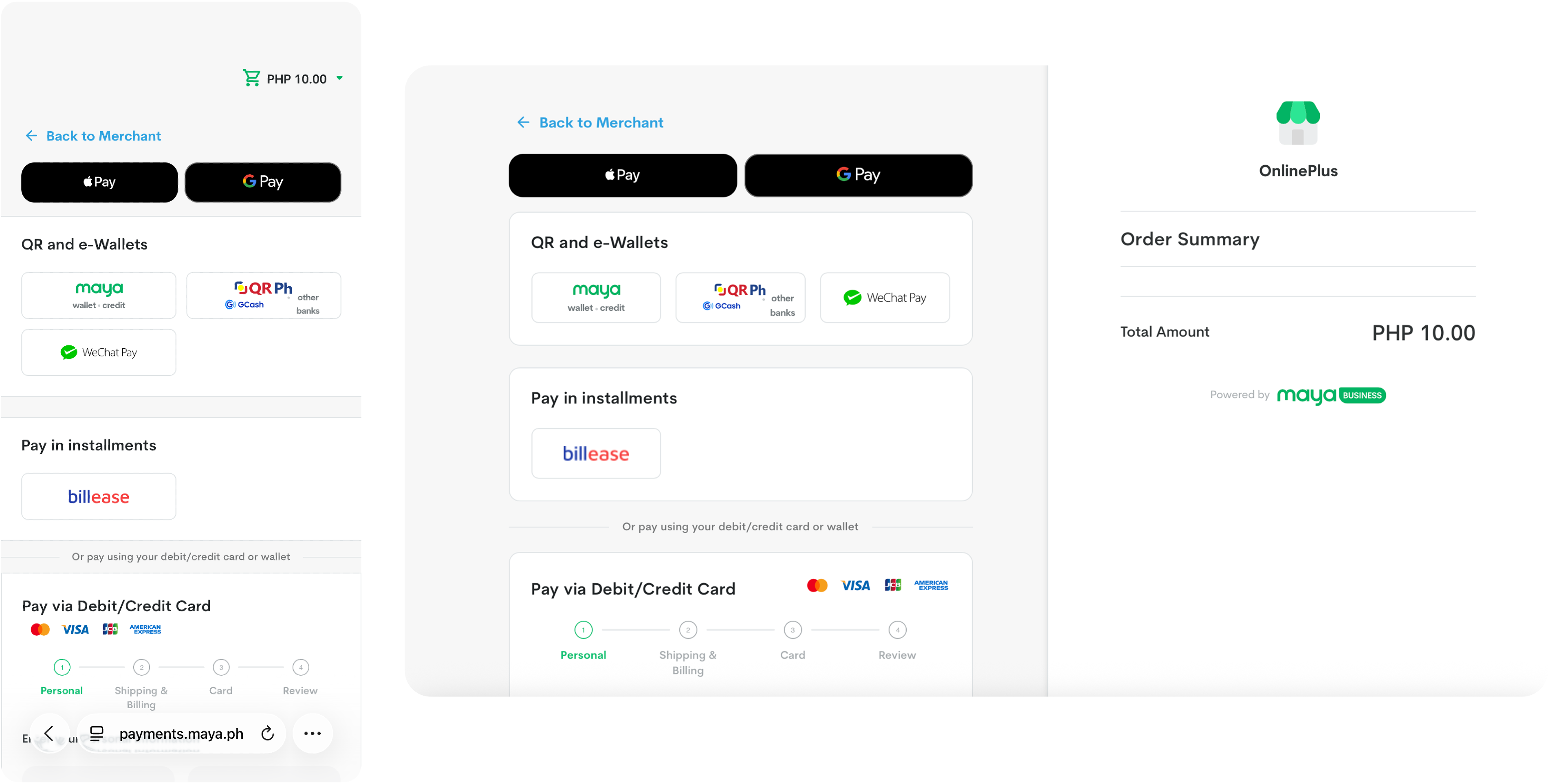
Step 2: Select Apple Pay
If Apple Pay is available, you'll see the Apple Pay button at checkout.
Tap Apple Pay to continue.
Step 3: Review Your Payment Details
Apple Pay will open a payment sheet showing:
- Your selected payment card
- Shipping address (if required)
- Contact information
- Order total
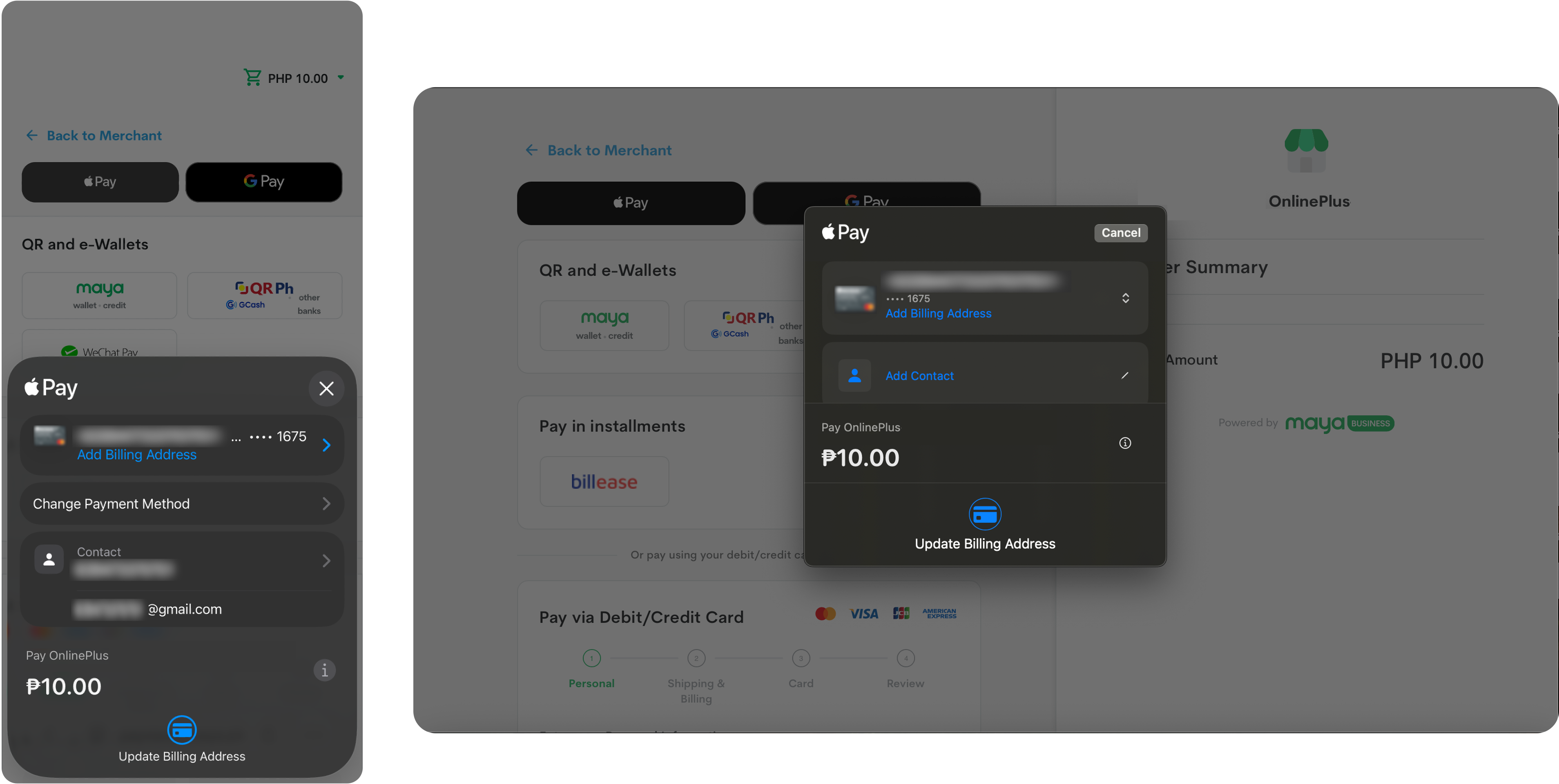
Need to use a different card? Simply select another card stored in your Apple Wallet before proceeding.
Step 4: Confirm the Payment
Once you've reviewed your details, authenticate the transaction using your Apple device:
- Face ID on supported iPhone or iPad models
- Touch ID on supported devices
- Device passcode when required
Depending on the device, you may be asked to double-click the side button before authenticating.
Step 5: Payment Complete
After authentication, Apple Pay securely submits the payment through Maya Checkout.
You'll see a confirmation on your device, and the website will display your order confirmation screen. Successful Apple Pay transactions are typically indicated by a confirmation message and checkmark on the device.
… And That's It
No card numbers to type. No lengthy forms to fill out. No scrambling to find your wallet.
Just a fast, secure way to complete your purchase in a few simple taps.
When Speed Matters Most
Whether it's securing concert tickets, booking a last-minute flight, ordering lunch between meetings, or checking out during a flash sale, Apple Pay helps customers complete purchases in seconds.
Because sometimes the best payment experience isn't the one with the most features. It's the one that gets out of the way.
What This Means for Businesses
Customers notice when checkout feels effortless. They notice even more when it doesn't.
For businesses, especially those operating at scale, even small improvements to the checkout experience can translate into meaningful business outcomes.
With Apple Pay on Maya Checkout, businesses can:
Create a Faster Checkout Experience
Customers spend less time entering information and more time completing purchases.
Improve Security and Customer Trust
Customers don't need to pull out a card, type sensitive details, or save payment information across multiple sites. Instead, authentication happens directly on their Apple device using Face ID, Touch ID, or their passcode.
Combined with Maya's secure payment infrastructure, businesses can offer a checkout experience that's both convenient and trustworthy.
Make Mobile Shopping Easier
Typing card details on a mobile screen isn't anyone's favorite activity. Apple Pay removes much of that friction.
Build Customer Confidence
Many customers are already familiar with Apple Pay. Seeing a trusted payment option at checkout can help reinforce confidence at a critical moment in the buying journey.
Keep Operations Simple
Apple Pay is available through Maya Checkout, which means businesses can offer another popular payment option without managing a separate checkout experience.
More convenience for customers. No added complexity for businesses.
Already Using Maya Checkout? You're Ready.
Here's the best part.
If you're already accepting card payments through Maya Checkout, there's no separate Apple Pay integration to manage.
Once card acceptance is enabled, Apple Pay automatically becomes available to eligible customers.
No additional setup. No extra development work. No changes to your existing checkout flow.
Just a better payment experience, ready when your customers need it.
Not yet using Maya Checkout?
Register for a Maya Business Account and start accepting payments through Maya Checkout. Once card acceptance is enabled, you'll be ready to offer Apple Pay as part of your checkout experience.
The Future of Checkout Is Less Checkout
The best technology often fades into the background.
Customers don't think about payment methods. They think about getting the tickets, booking the trip, placing the order, or completing the purchase.
Apple Pay on Maya Checkout helps make that final step feel effortless.
For customers, it's a faster and more secure way to pay. For businesses, it's a simple way to offer the modern checkout experience customers increasingly expect.
Apple Pay is now available on Maya Checkout.
Explore the Maya Developer Hub to learn more about integrating Apple Pay through Maya Checkout. For additional implementation guidance and technical resources, visit the Apple Pay Developer site.
Contributor

Learn more about Maya!
- Head back to our Maya Tech Blog for more interesting articles
- Keep up with the latest stories of innovation from Maya Stories
- or Check us out in LinkedIn.