# Transfer funds from your Business Deposit via Maya Business Manager

Transfer funds from your **Maya Business Deposit Account** to various destinations including Maya Wallet, Maya Bank Account, Maya Business App (Negosyo), or to banks participating in Instapay/Pesonet.

***

# Transfer Funds

Transfer funds from your Maya Business Deposit Account using the Maya Business Manager.

[block:html]
{
  "html": "<style>\n  .model-wrapper {\n    display: grid;\n    grid-template-columns: repeat(1, 1fr);\n  }\n  \n  .right-image {\n    width: 100%;\n    margin-top: 5%;\n    --background-color: blue;\n  }\n  \n  .journeys-wrapper>.image-entry, \n  .right-image>.image-entry, \n  .right-image>.additional-entry, \n  .content-entry,\n  .note-entry {\n    display: none;\n  }\n  \n  .ux-headers {\n    color: #3B2699;\n    font-size: 18px;\n    padding-top: 15px;\n    padding-bottom: 5px;\n  }\n  \n  .image-header {\n    display: none;\n  }\n  \n  .headings {\n    color: #3B2699;\n    font-size: 25px;\n    font-weight: bold;\n  }\n  \n  .additional-entry {\n    font-size: 14px; \n    margin-top: 15px;\n  }\n  \n  .content-entry {\n    padding-left: 20px;\n    padding-top: 5px;\n  }\n  \n  .left-contents {\n    padding-right: 10px;\n  }\n  \n  .model-contents {\n    display: none;\n  }\n  \n  .journeys-wrapper>.show-model, \n  .right-image>.show-content, \n  .right-image>.show-model, \n  .right-entry>.additional-entry,\n  .left-contents>.show-model,\n  .left-contents>.show-content{\n    display: block;\n  }\n  \n  .model-contents>.show-content {\n    background-color: #f7fbfe;\n    border-left: 3px solid #3B2699;\n    display: block;\n  }\n  \n  .ux-headers>.show-content {\n    font-weight: bold;\n  }\n  \n  .ux-headers:hover {\n    font-weight: bold;\n  }\n  \n  .model{\n    list-style:none;\n    margin-bottom:0;\n    padding-left:0;\n  }\n  \n  .model>li>a{\n    color: #3B2699;\n    display:block;\n    padding:10px 15px;\n    position:relative;\n  }\n  \n  .model>li>a:hover{\n    background-color: #382893;\n    color: white;\n  }\n  \n  .model-pills {\n    background-color: #f0eff2;\n    border-radius: 2rem;\n    color: #3B2699;\n    display: flex !important;\n    justify-content: safe center !important;\n    list-style-type: none !important;\n    margin: 0 !important;\n    overflow-x: visible;\n    white-space: nowrap;\n    padding: 0 2px 2px 0 !important;\n    width: 80%;\n    font-size:15px;\n  }\n  \n  .model-pills > .model-item {\n    float:left;\n    list-style-type: none !important;\n    margin: 2px 0 2px 0;\n    width: 100%;\n  }\n  \n  .model-pills>li>a{\n    border-radius:4px;\n  }\n\n  .model-pills>li+li{\n    margin-left:5px;\n  }\n  \n  .model-link, .content-link {\n    text-decoration: none !important;\n    transition: color .15s ease-in-out, background-color .15s ease-in-out, border-color .15s ease-in-out;\n  }\n  \n  .model-item .model-link {\n    border-radius: 2rem;\n    color: #3B2699;\n    padding: 10px !important;\n    text-align: center !important;\n    text-decoration: none !important;\n  }\n  \n  .model-item>.show-model {\n    background-color: #3B2699;\n    color: white;\n    font-weight: bold;\n  }\n  \n  .journeys-wrapper {\n    --background-color: #eeeeee;\n    border: 3px solid #eeeeee;\n    border-radius: 1rem;\n    padding: 30px 15px;\n  }\n  \n  .model3-steps {\n    padding-top: 50px !important;\n  }\n  \n  .dot {\n    height: 12px;\n    width: 12px;\n    background-color: none;\n    border: 2px solid #3B2699;\n    border-radius: 50%;\n    display: inline-block;\n  }\n  \n  .show-content>.dot {\n    background-color: #3B2699;\n  }\n  \n  @media screen and (max-width: 1120px) {\n    .model-pills {\n      width: 100%;\n     -- overflow-x: scroll;\n      white-space: nowrap;\n      border-radius: 0;\n    }\n    \n    .model-pills > .model-item {\n      flex: none;\n      flex-basis: auto;\n      flex-grow: 0;\n      width: 50%;\n      max-width: 100%;\n    }\n  }\n  \n  @media screen and (min-width: 1120px) {\n    /** Use Case Boxes or Options **/\n    .model-wrapper {\n      grid-template-columns: repeat(2, 35% 65%);\n    }\n  }\n  \n</style>"
}
[/block]

<div class="journeys-wrapper">

[block:html]
{
  "html": "<br><center>\n<ul id=\"nav-switch\" class=\"model model-pills\">\n  <li></li>\n  <li class=\"model-item\" oncontextmenu=\"return false;\"> \n    <a class=\"model-link show-model\" href=\"#bank-deposit-single-recipient\" id=\"bank-deposit-single-recipient\">To a Single Recipient</a>\n  </li>\n\t<li class=\"model-item\" oncontextmenu=\"return false;\"> \n    <a class=\"model-link\" href=\"#bank-deposit-multiple-recipients\" id=\"bank-deposit-multiple-recipients\">To Multiple Recipients</a>\n  </li>\n</ul>\n</center><br>"
}
[/block]

<div class="image-header bank-deposit-single-recipient show-model">

<span class="headings">To a Single Recipient</span>

Transfer funds from your Maya Business Deposit account to the recipient account.</div>

<div class="image-header bank-deposit-multiple-recipients">

<span class="headings">To Multiple Recipients</span>

Transfer funds from your Maya Business Deposit account to multiple recipients.

</div>

<div class="model-wrapper">

<div class="left-contents">

<br />

<br />

<br />

<div class="model-contents bank-deposit-single-recipient show-model">

<div class="ux-headers"><a class="content-link default-bank-deposit-single-recipient show-content" href="#bank-deposit-single-recipient-step-1" id="bank-deposit-single-recipient-step-1">1: Select destination</a></div>

<div class="ux-headers"><a class="content-link" href="#bank-deposit-single-recipient-step-2" id="bank-deposit-single-recipient-step-2">2: Enter Recipient's Account Information</a></div>

<div class="ux-headers"><a class="content-link" href="#bank-deposit-single-recipient-step-3" id="bank-deposit-single-recipient-step-3">3: Edit and Review Transacton</a></div>

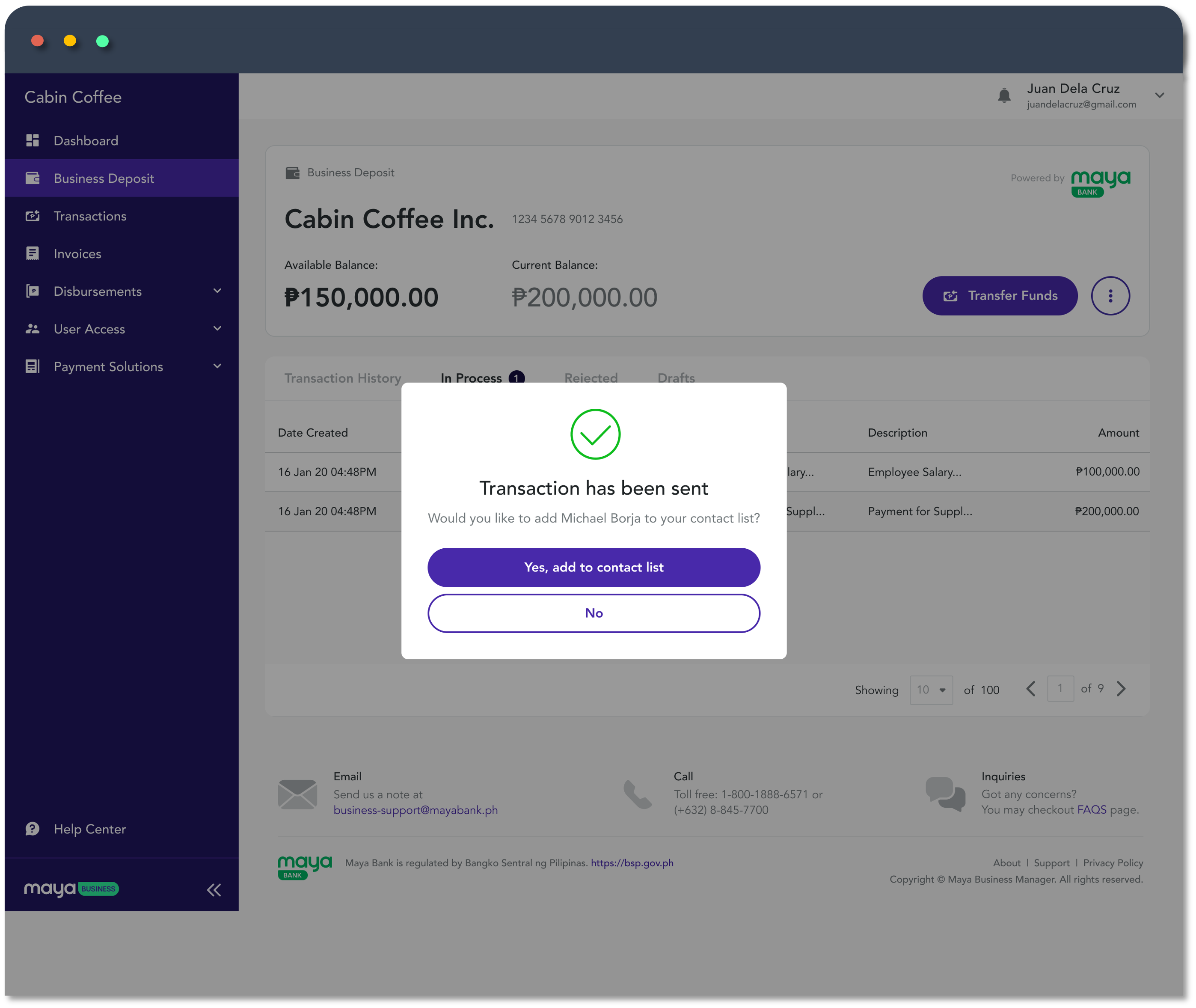
<div class="ux-headers"><a class="content-link bank-deposit-single-recipient-opt" href="#bank-deposit-single-recipient-step-4" id="bank-deposit-single-recipient-step-4">4: Complete the Transaction</a></div>

</div>

<div class="model-contents bank-deposit-multiple-recipients">

<div class="ux-headers"><a class="content-link default-bank-deposit-multiple-recipients show-content" href="#bank-deposit-multiple-recipients-step-1" id="bank-deposit-multiple-recipients-step-1">1: Select destination</a></div>

<div class="ux-headers"><a class="content-link" href="#bank-deposit-multiple-recipients-step-2" id="bank-deposit-multiple-recipients-step-2">2: Add Recipients</a></div>

<div class="content-entry bank-deposit-multiple-recipients-step-2">

Add multiple recipients manually or upload a CSV file.

The **CSV template** for bulk upload is available inside Maya Business Manager.

</div>

<div class="ux-headers"><a class="content-link" href="#bank-deposit-multiple-recipients-step-3" id="bank-deposit-multiple-recipients-step-3">3: Edit and Review Transaction</a></div>

<div class="content-entry bank-deposit-multiple-recipients-step-3">

Edit and review the recipients and transaction details.

</div>

<div class="ux-headers"><a class="content-link bank-deposit-multiple-recipients-opt" href="#bank-deposit-multiple-recipients-step-4" id="bank-deposit-multiple-recipients-step-4">4: Complete the Transaction</a></div>

<div class="content-entry bank-deposit-multiple-recipients-step-4 bank-deposit-multiple-recipients-opt">

View the result of your bulk transfer by clicking the <a class="content-link" href="#bank-deposit-multiple-recipients-opt" id="bank-deposit-multiple-recipients-opt">**View Recipients**</a> in Maya Business Manager.

</div>

</div>

<div class="note-entry note-yellow bank-deposit-single-recipient-step-4 bank-deposit-multiple-recipients-step-4 bank-deposit-single-recipient-opt bank-deposit-multiple-recipients-opt">

**Approval may be required**

Depending on the actor’s role within your organization, transfers may need approval from an administrator.

</div>

<br />

<div class="note-entry note-green bank-deposit-single-recipient-step-4 bank-deposit-single-recipient-opt">

**Save recipient to Address Book**

<a class="content-link" href="#bank-deposit-single-recipient-opt" id="bank-deposit-single-recipient-opt">**Save the recipient details**</a> in your Address Book to quickly transfer funds next time.

</div>

</div>

<div class="right-image">

<div class="image-entry bank-deposit-single-recipient-step-1 bank-deposit-multiple-recipients-step-1 default-bank-deposit-single-recipient default-bank-deposit-multiple-recipients show-content">

[block:image]
{
  "images": [
    {
      "image": [
        "https://files.readme.io/abbf710-bd-tfr-step-1.png",
        null,
        ""
      ],
      "align": "center",
      "sizing": "100% "
    }
  ]
}
[/block]

</div>

<div class="image-entry bank-deposit-single-recipient-step-2">

[block:image]
{
  "images": [
    {
      "image": [
        "https://files.readme.io/e4c3b7f-fund-transfer-single-step-2-v2.png",
        "",
        ""
      ],
      "align": "center",
      "sizing": "100% "
    }
  ]
}
[/block]

</div>

<div class="image-entry bank-deposit-multiple-recipients-step-2">

[block:image]
{
  "images": [
    {
      "image": [
        "https://files.readme.io/8910e8b-bd-tfr-multiple-step-2.png",
        "",
        ""
      ],
      "align": "center",
      "sizing": "100% "
    }
  ]
}
[/block]

</div>

<div class="image-entry bank-deposit-single-recipient-step-3">

[block:image]
{
  "images": [
    {
      "image": [
        "https://files.readme.io/2b10558-fund-transfer-single-step-3-v2.png",
        "",
        ""
      ],
      "align": "center",
      "sizing": "100% "
    }
  ]
}
[/block]

</div>

<div class="image-entry bank-deposit-multiple-recipients-step-3">

[block:image]
{
  "images": [
    {
      "image": [
        "https://files.readme.io/ee82edb-fund-transfer-multiple-step-3v2.png",
        "",
        ""
      ],
      "align": "center",
      "sizing": "100% "
    }
  ]
}
[/block]

</div>

<div class="image-entry bank-deposit-single-recipient-step-4">

[block:image]
{
  "images": [
    {
      "image": [
        "https://files.readme.io/31a53c5-fund-transfer-single-step-4b.png",
        "",
        ""
      ],
      "align": "center",
      "sizing": "100% "
    }
  ]
}
[/block]

</div>

<div class="image-entry bank-deposit-multiple-recipients-step-4">

[block:image]
{
  "images": [
    {
      "image": [
        "https://files.readme.io/fd1fcdf-fund-transfer-multiple-step-4.png",
        "",
        ""
      ],
      "align": "center",
      "sizing": "100% "
    }
  ]
}
[/block]
</div>

<div class="image-entry bank-deposit-single-recipient-opt">

![](https://files.readme.io/4bea2da-bd-address-book-1.png)

</div>

<div class="image-entry bank-deposit-multiple-recipients-opt">

[block:image]
{
  "images": [
    {
      "image": [
        "https://files.readme.io/0021427-fund-transfer-multiple-opt.png",
        "",
        ""
      ],
      "align": "center"
    }
  ]
}
[/block]

</div>

</div></div>

</div>

***

# Transfer Fees

<div class="note-blue">

Fees are subject to change without prior notice. We reserve the right to adjust prices, discounts, and offers based on availability, market conditions, and other factors. Terms and conditions apply to all promotional offers. For the most current rates and promotions, please visit our <a href="https://www.mayabank.ph/" target="_blank" style="text-decoration:none;">**Maya Bank** <img class="icon-redirect"/></a> website or contact our <a href="https://support.mayabank.ph/s/maya-business" target="_blank" style="text-decoration:none;">**customer service team**</a>.</div>