---
updatedAt: 2026-10-26T12:32:39.000Z
---
# One-time straight payment
# How to Integrate
## 1 Obtain your API Keys
[block:html]
{
"html": "\n \n ℹ️\n If you already have your API keys and know how to use it, you may proceed to the next step.\n
\n
"
}
[/block]
The Payments Processing Platform APIs uses API keys to authenticate requests. API keys carry many privileges, your grant or permission to access and integrate with Maya’s endpoints.
[block:html]
{
"html": "\n
Step 1: Prepare your Public GPG Keys to be submitted to Maya. Don’t have keys yet? Learn How 
\n
Step 2: Provide email address of the nominated recipient of the API Keys.
\n
Step 3: Credentials and keys will be received via an encrypted email. You should be able to decrypt it using your public and private GPG keys.
\n
\n \n 📖\n Different API keys will be provided for each environment: Sandbox or Production.\n
\n
"
}
[/block]
### Authenticating with our API
Authentication is done via **HTTP Basic Authentication**. Depending on the API endpoint, the **public (pk-....)** or **secret (sk-....)** key must be provided as the username and the password left as blank.
#### Steps are as follows:
1. Combine Username and Password (left blank) separated by ‘:’ (colon). If your API key is “pk-Z0OSzLvIcOI2UIvDhdTGVVfRSSeiGStnceqwUE7n0Ah”, the resulting string is:
```
pk-Z0OSzLvIcOI2UIvDhdTGVVfRSSeiGStnceqwUE7n0Ah:
```
2. Apply Base64 encoding to the resulting string from Step 1. Using the resulting string from Step 1, the Base64 encoded string will be:
```
cGstWjBPU3pMdkljT0kyVUl2RGhkVEdWVmZSU1NlaUdTdG5jZXF3VUU3bjBBaDo=
```
3. Indicate the authorization method i.e. “Basic” followed by a space then the Base64 encoded string in Step 2. An example is shown below.
```
Authorization: Basic cGstWjBPU3pMdkljT0kyVUl2RGhkVEdWVmZSU1NlaUdTdG5jZXF3VUU3bjBBaDo=
```
[block:html]
{
"html": "\n See also: HTTP Basic Auth \n
"
}
[/block]
## 2 Create Straight Payment
[block:html]
{
"html": "\n \n
POST /p3/pay
\n
\n \n 🧩\n\t\tTips\n
\n \n \n It is highly recommended that you perform the 3D Secure or 3D Secure 2 (3DS or 3DS2) authentication to increase your success rate and prevent transaction from getting declined by the issuing banks.\n
\n \n You will be responsible for performing the 3D Secure or 3D Secure 2 (3DS or 3DS2) authentication leg, including, but not limited to, integrating with its own or a 3rd party Merchant Plug-in (MPI). \n
\n
"
}
[/block]
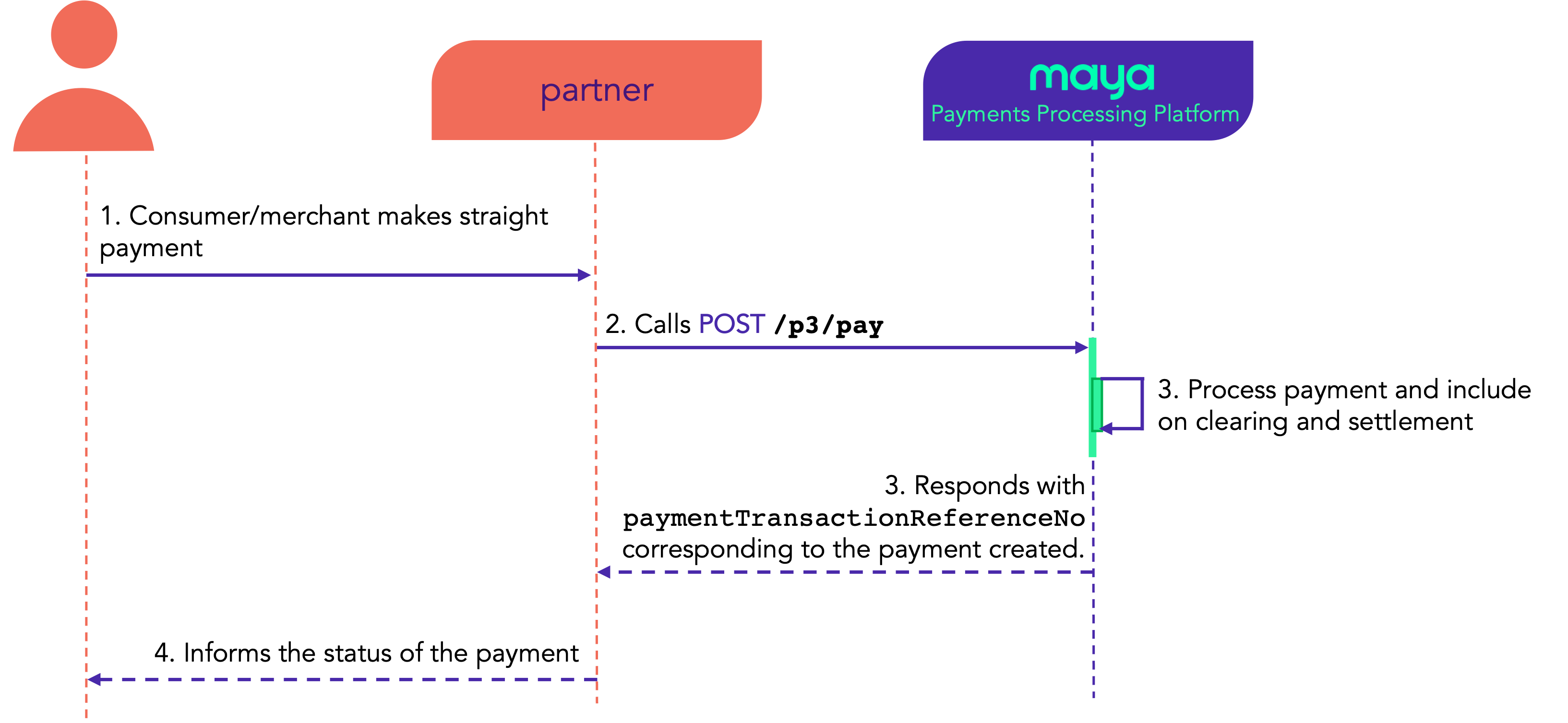
Use this endpoint and provide basic payment details when performing a straight payment.
* A successful straight payment request will generate a `paymentTransactionReferenceNo`.
* Successful straight payment will be processed for clearing and settlement on the next cut-off schedule.
Funding instrument must be set to indicate the type of source of funds or where payment will be charged. Payments Processing Platform currently supports `fundingInstrument`: CARD
**When card is used**, you need to indicate the account type and card type where the transaction should be charged.
[block:html]
{
"html": "\n \n ACCOUNT TYPE\n
\n (Customer’s account type linked to the card) | \n CARD TYPE\n
\n (Type of the card used at the point-of-sale) | \n
\n \n | DEBIT | \n CREDIT | \n
\n \n | Default | \n ✅ | \n ✅ | \n
\n \n | Savings | \n ✅ | \n | \n
\n \n | Current | \n ✅ | \n | \n
\n \n | Credit | \n | \n ✅ | \n
\n
"
}
[/block]
##### For E-commerce
Click to see full details
Maya’s **Payments Processing Platform** supports authorizations for **3D Secure or 3D Secure 2** (3DS or 3DS2) authenticated e-commerce transactions. You may specify the result of the authentication in the `threeDSecure` object (by providing the verification token) to complete an authenticated transaction.
```json
"threeDSecure":
{
"verificationToken": "jqEmJkhI2+SDCAAAAAAJBwAAAAA=",
"eci": "05",
"enrolled": "Y",
"authenticationStatus": "Y"
}
```
##### For Card-present
Click to see full details
Card-present transactions supports the following card entry methods:
* EMV: Contact Chip (Integrated-Circuit Card)
* EMV: Contactless Chip (Integrated-Circuit Card)
* Magnetic Stripe
* Contactless Magnetic Stripe
[block:html]
{
"html": "\n \n ℹ️\n\t\tEMV (chip-based) transactions\n
\n \n For chip-based requests, the emvIccData contains the Base64 encoded value of the binary TLV chip data read from the card. For example, for the following TLV data:\n
\n
\n \t82021C008407A0000000031010950580000000009A031704199C01005F2A0206089F02060000000001009F03060000000000009F1012060A0A03A080000A0200000000006E79F3999F1A0206089F1E0850594D59504F53319F26080E7F58B5275B72B19F2701809F33032020C89F34031E03009F3501219F360200CA9F3704A397A2559F4104000000019F6E0420000000\n \t
\n
\n The resulting emvIccData should be:\n
\n
\n ggIcAIQHoAAAAAMQEJUFgAAAAACaAxcEGZwBAF8qAgYInwIGAAAAAAEAnwMGAAAAAAAAnxASBgoKA6CAAAoCAAAAAABuefOZnxoCBgifHghQWU1ZUE9TMZ8mCA5/WLUnW3KxnycBgJ8zAyAgyJ80Ax4DAJ81ASGfNgIAyp83BKOXolWfQQQAAAABn24EIAAAAA==\n
\n
"
}
[/block]
#### Initiator and Intent
You can indicate the **initiator** and the **intent** of the transaction in the **Straight Payment** requests. The value in these fields may be used by Issuers when determining the approval status of an authorization transaction.
[block:html]
{
"html": "\n \n 📖\n Recurring transactions (i.e., transaction.frequencyIndicator = RECURRING)\n\t
\n\t
\n These transactions will be treated as merchant-initiated transactions, regardless of the value of transaction.initiator.\n
\n
"
}
[/block]
##### INITIATOR (`transaction.initiator`)
Click to see full details
The **transaction initiator** is **the entity that initiated the authorization request**. The following initiators are supported by the API:
[block:html]
{
"html": "\n \n 🧠\n\t\tKeep in mind\n
\n \n By default, transaction is treated as CONSUMER initiated if initiator was not specified.\n
\n
\n\n\n \n CONSUMERDEFAULT | \n Indicates that transaction is consumer initiated (e.g., consumer explicitly purchased an item from the merchant) | \n
\n \n MERCHANT | \n Indicates that transaction is merchant initiated (e.g., charging subsequent miscellaneous fees after the original transaction) | \n
\n
\n"
}
[/block]
##### INTENT (`transaction.intent`)
Click to see full details
**Transaction intent** is **a general description of the purpose of the authorization request**. The following intents are supported by the API:
[block:html]
{
"html": "\n \n 🧠\n\t\tKeep in mind\n
\n \n If intent is not specified, transaction will be, by default, intended for PAYMENT.\n
\n
\n\n\n \n PAYMENTDEFAULT | \n Indicates that the authorization request is being done to collect payment from the consumer for goods/services rendered. | \n
\n \n VAULTING | \n Indicates that the request intends to store the consumer’s credentials after a successful authorization. \n
\n\t\t\t\tNormally, authorizations with the VAULTING intent are voided/refunded afterwards, as the results are only used for validating the consumer’s credentials. \n\t\t\t
\n This value should be set even if the client intends to collect payment from the authorization request as well, as long as the client intends to store the credentials afterwards.\n | \n
\n
"
}
[/block]
#### Reference Numbers
The following reference numbers can be set to provide additional tagging for each transaction during reconciliation processes:
In Request Header
[block:html]
{
"html": "\n \n \n \tRequest-Reference-NoREQUIRED\n \t\n \n A reference number sent by the API caller to tag the transaction in Payments Processing Platform.\n \n | \n
"
}
[/block]
In Request Body
[block:html]
{
"html": "\n \n \n \n merchant.metadata.refNoOPTIONAL\n \n \n A reference number sent by the merchant involved in the transaction.\n
\n
\n ℹ️ If the API caller is a merchant, this field can be populated with the same value as the Request-Reference-No, or omitted in favor of the value of Request-Reference-No.\n
\n
\n ℹ️ Payment Gateways can use this field to include the reference number sent by their transacting merchant to identify the transaction.\n \n | \n
\n \n \n \n \n merchant.paymentFacilitator.subMerchants[0].metadata.refNoOPTIONAL\n \n \n A reference number sent by the sub-merchant involved in a transaction sent by a payment facilitator.\n \n | \n
\n
"
}
[/block]
[block:html]
{
"html": "\n
\n Using Vaulted/Stored Credentials\n
\n \t
\n\t\t\tVaulted card transaction no longer contains the card security code (CSC). However, Issuers may decline transactions more often due to the lack of a secondary authentication mechanism (since both 3D Secure or 3D Secure 2 (3DS or 3DS2), and CSC validation are no longer performed).\n \t
\n \n \n
\n \t\n \t🧩\n\t\t\tTips\n\t
\n \n Indicate that the credit card information of the transaction came from its storage by setting payer.fundingInstrument.card.vaulted to true.\n
\n
\n\t\t\t\t\tThis will help relax the acceptance requirements of issuers, since it is assumed that you have already previously authenticated the cardholder by different means.\n
\n\t
\n
\n \n ⚠️\n Transaction retains only up to a period of 90 days in its Sandbox environment and 390 days in its Production environment.\n
\n
"
}
[/block]
### Void Transaction
[block:html]
{
"html": "\n \n
POST /p3/void
\n
\n 🧠Keep in mind
\n \n You can only void straight payment done on or before 11:59:59 PM (PH Standard Time) cut-off of the same day as transaction date, otherwise refund is your option.\n
\n
"
}
[/block]
[block:image]
{
"images": [
{
"image": [
"https://files.readme.io/a4f1591-P3_void.png",
null,
""
],
"align": "center",
"sizing": "60% "
}
]
}
[/block]
[block:html]
{
"html": "\n ℹ️\n In case a response is not received by the API client (e.g., timeout or connectivity error occurred), the client may send a void request with the following fields from the previous purchase request:\n
\n \n paymentRequestReferenceNomerchantIdamount
\n \n However, ifpaymentTransactionReferenceNo is already provided, the fields above are ignored.\n
\n
"
}
[/block]
### Refund Transaction
[block:html]
{
"html": "\n \n
POST /p3/refund
\n
\n 🧠Keep in mind
\n \n You can only refund straight payment after the 11:59:59 PM (PH Standard Time) cut-off, otherwise, use void.\n
\n
"
}
[/block]
[block:image]
{
"images": [
{
"image": [
"https://files.readme.io/387688a-P3_refund.png",
null,
""
],
"align": "center",
"sizing": "60% "
}
]
}
[/block]
### Clients can perform either full or partial refunds.
#### Full Refunds
* You just need to provide the `transactionReferenceNo` of the transaction to refund the full amount.
#### Partial Refunds
* You need to provide `transactionReferenceNo` and the `amount` to be refunded. You may continue to send partial refund requests until the entire amount for the transaction has been refunded.
[block:html]
{
"html": "\n ℹ️\n You can do multiple and partial refunds for a straight payment, as long as the total refund amount does not exceed the full amount of the transaction.\n
\n
"
}
[/block]
## 3 Test your Work
[block:html]
{
"html": "\n Test your services by simulating transactions in our sandbox environment. You may use the test accounts available in Sandbox Test Credentials and Cards .\n
\n\n\n\n 🧩Tips
\n \n Use the Transaction Inquiry endpoints to track and monitor your transactions.\n
\n
"
}
[/block]
If you're experiencing **server errors** or **timeouts**, check the
**Sandbox Health Page** ![]()
for real-time updates on service status. If an outage is indicated, rest assured that our team is already on it, working to restore services as soon as possible.